You pick the videos.
They watch only those.
A free Android TV app that plays videos from playlists you choose — nothing else. Works with YouTube™. No algorithm. No ads. No surprises.
A free Android TV app that plays videos from playlists you choose — nothing else. Works with YouTube™. No algorithm. No ads. No surprises.
You’re not anti-screen. You use screens strategically — to cook dinner, take a work call, or just breathe for 20 minutes. The problem isn’t screen time. The problem is that YouTube and other video apps decide what your kid watches next — and you don’t.
Your kid starts watching a playlist you found. Ten minutes later: unboxing videos, then toy commercials, then something in a language you don’t speak. You didn’t pick any of it. The algorithm did.
You set up YouTube Kids. You turned on Restricted Mode. Your kid still saw something that made you grab the remote. 46% of parents report the same thing. Source: Pew Research
Autoplay. Recommended videos. A search bar she learned to use at age 4. The app is designed to keep her watching — not to stop when the playlist ends.
You come back and he’s watching a video with 40 million views that you’d never have chosen. It autoplayed from something fine. You couldn’t have prevented it without sitting next to him the whole time.
You bookmarked an educational channel. But the YouTube interface has recommendations, search, and “related videos” everywhere. Your careful curation lasted exactly one tap.
You don’t need another app telling you screens are bad. You already know the trade-offs. You’re making the best call you can with the time and energy you have. You just want to pick which videos — and not worry about the rest.
Nobody else should decide what your child watches.
Not an algorithm. Not a company. Not even us.
You’re the parent. You decide.
Download the app file from this website and install it on any Android TV — Mi Box, Chromecast with Google TV, Shield, any Android TV box.
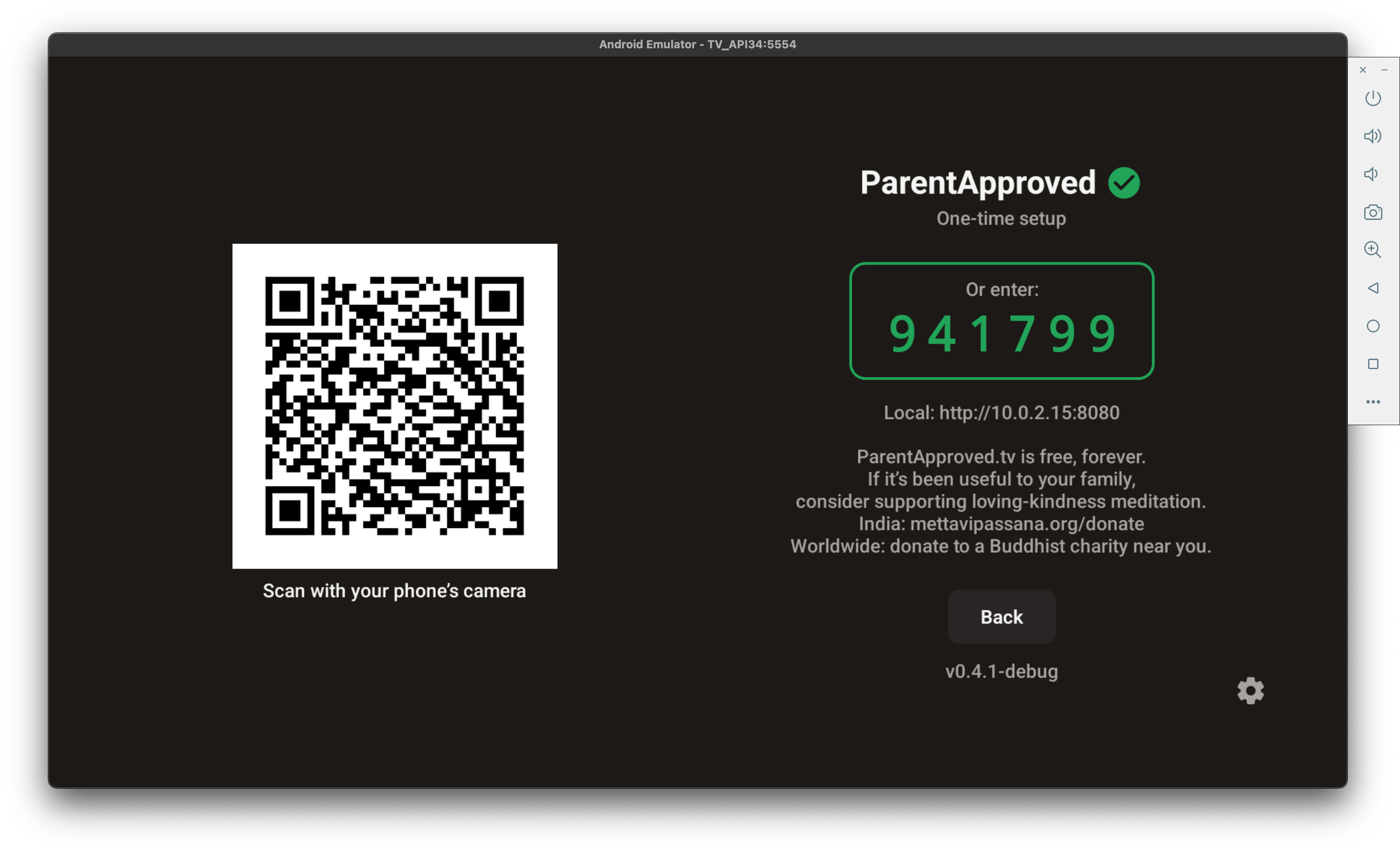
Scan the QR code on the TV with your phone. Enter the PIN. Your phone is now the remote control and management dashboard.
Paste any YouTube™ playlist URL. It shows up on the TV instantly. Your kids see only what you’ve approved.
That’s it. No account to create. No subscription. No cloud. Everything runs on your TV.
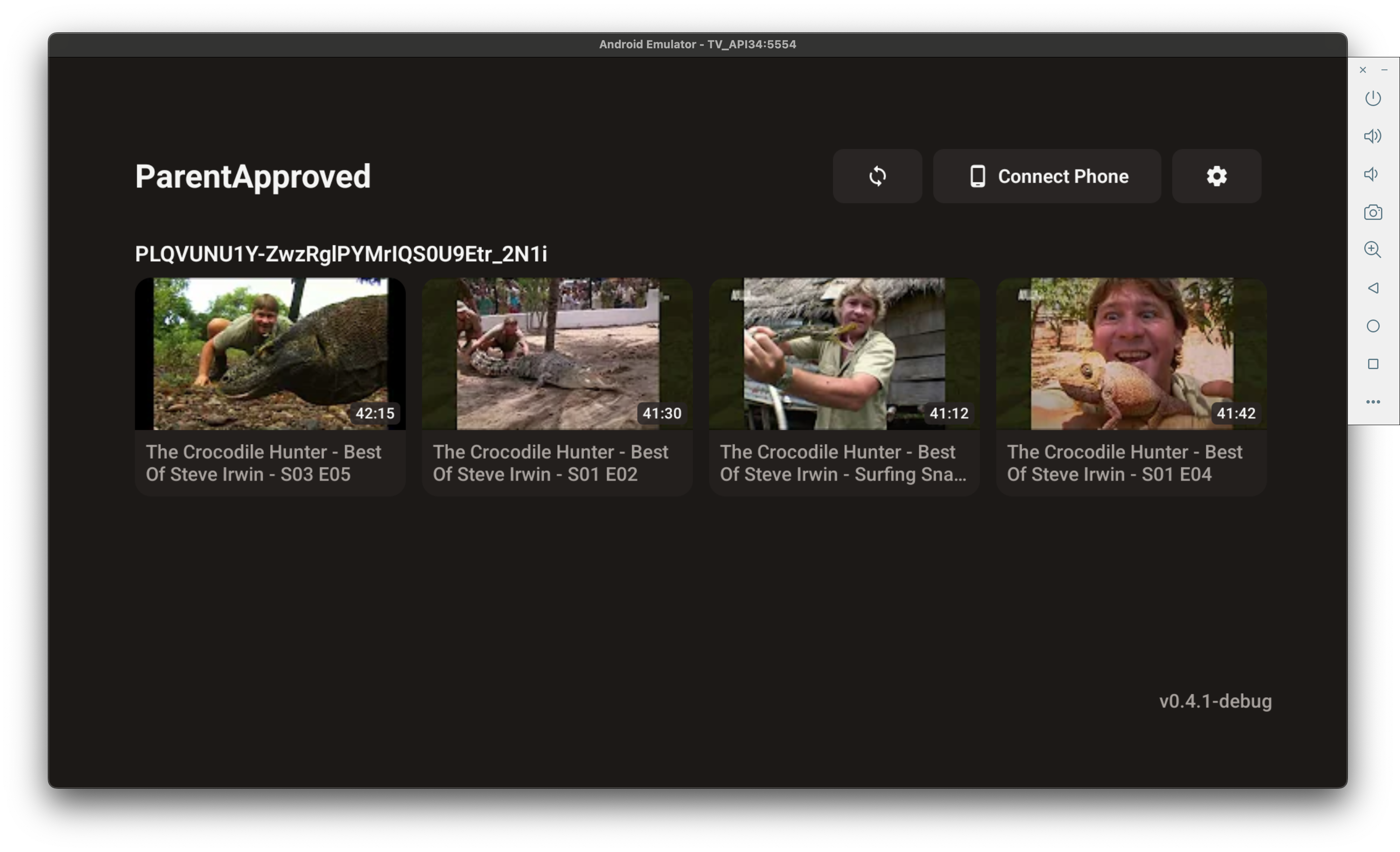
Here’s what your kid sees on the TV. Playlists you picked. Videos you approved. That’s it.
Manage everything from your phone’s browser. No app to install.
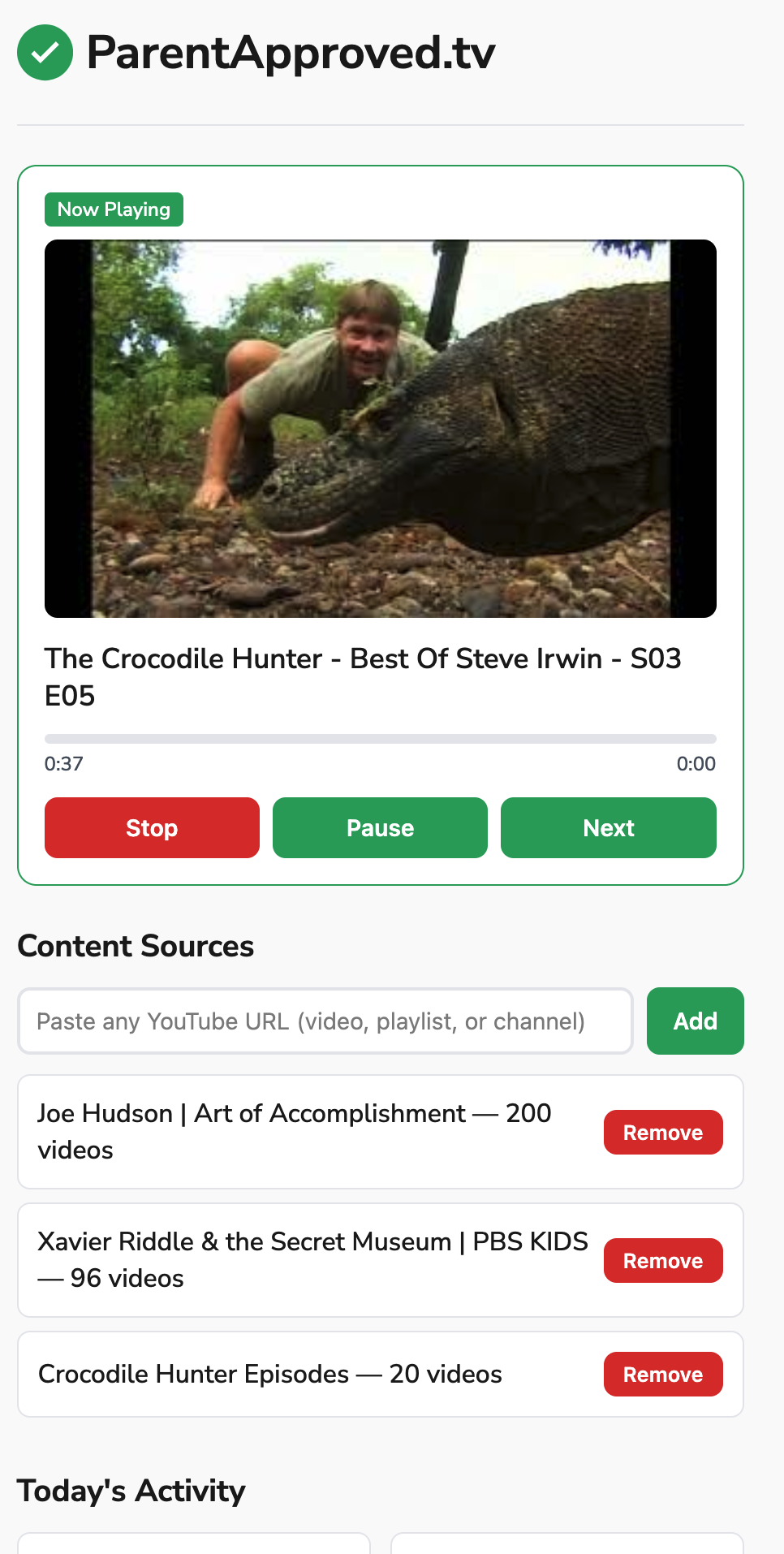
Paste a YouTube™ playlist URL. Remove with one tap. Changes appear on the TV right away.
Check the Now Playing card to see exactly which video your kid is watching, in real time.
Control playback from your phone. Works from another room — or from anywhere if Remote Access is on.
See what your kids watched and for how long. No judgment — just info so you can adjust playlists.
Safari, Chrome, Firefox — whatever you have. Open a web page, that’s your dashboard.
The dashboard is just a web page — no app to install on your phone. When you’re home, it connects over WiFi. Turn on Remote Access and it works from anywhere.
| ParentApproved.tv | YouTube™ Kids | Kidoodle.TV | SmartTube | |
|---|---|---|---|---|
| Who picks videos? | You (playlists) | Algorithm | The company | Nobody (open browse) |
| Ads? | Never | Yes (unless Premium) | Yes (free tier) | No |
| Algorithm? | None | Yes | Yes | Yes |
| Manage from phone? | ✓ Any browser | ✓ App only | ✗ | ✗ |
| Open source? | ✓ | ✗ | ✗ | ✓ |
| Cost | Free forever | Free w/ ads | $5/month | Free |
| Privacy | Stays on your TV | Google cloud | Cloud | Local |
Everything runs on your TV. Your phone connects over WiFi. No cloud. No account. No data leaves your house — unless you choose to turn on Remote Access for managing it from work or on the go.
Every line of code is on GitHub. Anyone can read it and verify exactly what the app does. We have nothing to hide because there’s nothing to hide.
View on GitHub →No subscription. No ads. No “premium tier.” No data to sell. This is a parent side project, not a startup. If you find it useful, consider donating to a children’s charity of your choice.
This app does one thing: play parent-approved videos on the TV. Currently works with YouTube™ playlists — support for other video sources is planned. It doesn’t track your kid. It just plays what you picked.
ParentApproved.tv is free, forever. No subscription. No ads. No catch.
If it’s been useful to your family, consider supporting loving-kindness meditation.
India: mettavipassana.org/donate
· Worldwide: donate to a Buddhist charity near you.
Loading version…
Download APKParentApproved isn’t on the Play Store (yet). Here’s how to sideload it:
parentapproved.tv/apkadb connect <tv-ip>:5555adb install ParentApproved.apkAbout 5 minutes. Download the app file, install it on your TV, scan a QR code with your phone, enter a PIN, and add your first playlist. Our install guide walks you through every step. After that initial setup, adding or removing playlists takes seconds.
No. There’s no account to create, no Google sign-in, and no login. Just install the app, scan the QR code with your phone, enter the PIN shown on the TV, and you’re in. Paste a playlist URL and it plays.
Yes. Installing apps outside the Play Store (“sideloading”) is a standard Android feature — it’s how many popular apps like SmartTube are installed on Android TV. Our app is completely open-source, so you (or anyone you trust) can read every line of code on GitHub. The app doesn’t collect personal data, doesn’t require unusual permissions, and doesn’t send information to any server unless you explicitly turn on Remote Access.
Any device running Android TV with Android 7.0 or higher. We’ve tested it on the Xiaomi Mi Box 4 (Android 9) and the Android TV emulator (Android 14). It also works on Chromecast with Google TV, NVIDIA Shield, and generic Android TV boxes. If your TV runs Android TV and is from the last few years, it should work.
YouTube Kids uses an algorithm to decide what your kid can watch. Even in “Approved Content Only” mode, the setup is clunky and doesn’t work well on TV devices. ParentApproved.tv takes a completely different approach: you paste playlist URLs, and your kid sees only those videos. No search bar, no recommendations, no algorithm, no ads. You have 100% control over every video that appears on the screen.
You do. That’s the whole point. We don’t pick “safe” content. We don’t filter or recommend. We don’t use AI to decide what’s appropriate. You choose the playlists. Your kids watch those playlists. Nobody knows your child better than you — and no algorithm or company should be making that decision for your family.
Yes, really free. No catch. This is open-source software built by a parent who had the same problem you do. There’s no company behind it, no investors, no business model. The code is on GitHub for anyone to read. If you find it useful, we suggest donating to a children’s charity — but that’s entirely up to you.
Yes. Each person scans the QR code on the TV and enters the PIN from their own phone — parents, grandparents, babysitters, whoever you trust. Everyone gets their own bookmark to the dashboard. They can all add playlists, control playback, and see watch history. The TV is the single source of truth — everyone sees the same playlists and the same data.
No. All data stays on your TV. Playlists, watch history, settings — everything is stored locally in a database on the TV itself. Nothing is sent to any cloud server. Nothing is tracked. There are no analytics, no cookies, no data collection of any kind. The app doesn’t even have the ability to send data anywhere unless you turn on Remote Access — and even then, the relay doesn’t store anything.
Inside the app, there’s no way to search for videos, no settings menu accessible to kids, and no way to browse anything you haven’t added. The Back button returns to the playlist screen. The one thing we can’t prevent: the Home button on the remote exits to the Android TV launcher. That’s an operating system limitation that no app can override. For a dedicated kids’ TV, you can set ParentApproved.tv as the default launcher (guide coming soon).
The TV needs internet to stream videos. But all your playlists and settings are stored locally on the TV — they survive reboots, power outages, and app updates. Nothing depends on a cloud service. If your internet goes out, the playlists are still there when it comes back.
The technology that plays videos occasionally needs updates when YouTube changes something on their end. When this happens, we release an updated version of the app. Sign up for email updates or watch the GitHub repository to get notified. These updates are usually quick — download the new app file and install it over the old one.
That’s the plan. Right now the app works with YouTube™ playlists. Support for other video URLs and sources is planned for a future version. The goal is to let you add any video from anywhere — not just YouTube.
Yes — if you choose to turn it on. Go to Settings on the TV and enable Remote Access. Your dashboard then works from anywhere — work, the bus, wherever. The relay is free and runs as charityware. If you prefer to keep everything on your home WiFi, just leave Remote Access off.
Yes. The relay just connects your phone to your TV when you’re not on the same WiFi. It passes requests through — that’s all it does. It doesn’t store playlists, videos, PINs, or watch history. Your TV is still in control and all data stays on it. The relay is open-source too, so anyone can verify this.
Open source means every line of code is published online for anyone to read. You know apps like Firefox and VLC? Same idea. Nothing hidden, nothing secret. If we say “we don’t collect data,” anyone can verify that by reading the code. It’s the strongest form of trust an app can offer.
It means the app works — real families use it — but it’s still being actively developed. You might hit rough edges. We’re honest about what’s done and what’s not. Your feedback during the beta directly shapes what gets built next. If something doesn’t work, tell us and we’ll fix it.
Email us at hello@parentapproved.tv — we read and reply to everything. You can also open an issue on GitHub. This app is built by a parent for parents — your feedback directly shapes what gets built next.
ParentApproved.tv is a free, open-source Android TV app where parents have 100% control over what plays. Unlike YouTube Kids (which uses an algorithm) or Kidoodle.TV (which picks content for you), ParentApproved.tv plays only the playlists you choose. No ads, no algorithm, no surprises. You manage everything from your phone’s browser.
Install ParentApproved.tv on your Android TV. It plays videos from YouTube™ playlists you choose — but without the YouTube app, search bar, recommendations, or ads. Your kids can’t browse or discover videos on their own. You can set it as the default launcher so the TV opens straight into your approved playlists.
ParentApproved.tv gives you a dashboard in your phone’s browser where you can add or remove playlists, see what’s playing right now, play/pause/skip videos, and see watch history. Works over your home WiFi, or from anywhere if you turn on Remote Access. No app to install on your phone — just open a web page.
Yes. ParentApproved.tv has zero algorithm. There are no recommendations, no autoplay suggestions, and no content the parent didn’t personally add. It plays your playlists in order and stops. No rabbit holes. No surprises. Just the videos you picked.
The safest approach is to choose every video yourself. ParentApproved.tv lets you do exactly that: paste YouTube™ playlist URLs, and your kids watch only those videos on the TV. No search, no browse, no algorithm. The app is free, open-source, and keeps all data on your TV — nothing goes to the cloud. It works on any Android TV device.